

Scientific Notation in Python


In this article I will write a simple module to display very large or very small numbers in scientific notation in a more appealing format than that used by Python.
Scientific Notation
It is common to show very large numbers such as

or very small numbers such as

in scientific notation, so the above numbers would be

and

You may remember being taught how to convert to and from scientific notation but here’s a refresher of the steps.
Move the decimal point left or right until you have a single digit in the integer part of the number (remember how far you moved the decimal point and in which direction), so the number

becomes

Cull decimal places as ruthlessly as you want. About 3 is a good number to end up with IMHO, so we now have

Now add " × 10”

Raise the 10 to the power of the number of digits you moved the decimal point; the power is negative if you moved it to the right.





Reversing the process is simple: just move the decimal point by the number of digits specified by the power, right for positive, left for negative, padding with 0s where necessary.
That’s fine if you are doing it using pen and paper but in terms of programming it’s basically string processing. It’s perfectly possible to program it that way but it would be very clumsy so for this project we’ll do it properly, using mathematics.
As you probably realised scientific notation breaks a number down into two components, the significand, 5.892 in the above example, and the exponent, eg. 35. Once we have these it’s simple to assemble them into a string representation of scientific notation. I’ll leave the description of this process until we get to the code, but note that as part of the process we need to take the logarithm of the number. This causes a couple of problems: what if the number is 0? And what if the number is <0? In both cases the logarithm is undefined, ie. it is a mathematical impossibility and if we try it Python will throw a ValueError: math domain error at us but we still need to represent numbers <= 0 as scientific notation. This is how I’ll handle these issues:
If the number is 0 we’ll just return “0” as the scientific notation.
If the number is <= 0 we’ll remember the fact, flip it to positive to generate the scientific notation, and then suffix the significand with a minus sign.
If you print a very large or very small number Python will automatically format it in its own scientific notation format. You can also force it to do so with any number using the :e format string. Python’s format looks like this:
5.892148e+35
Personally I think this is ugly and difficult to read. The purpose of this project is therefore to provide a more conventional format, and hopefully learn a bit about scientific notation along the way.
The Project
This project consists of the following files which you can find in the GitHub repository.
scientificnotation.py
sndemo.py
The Code
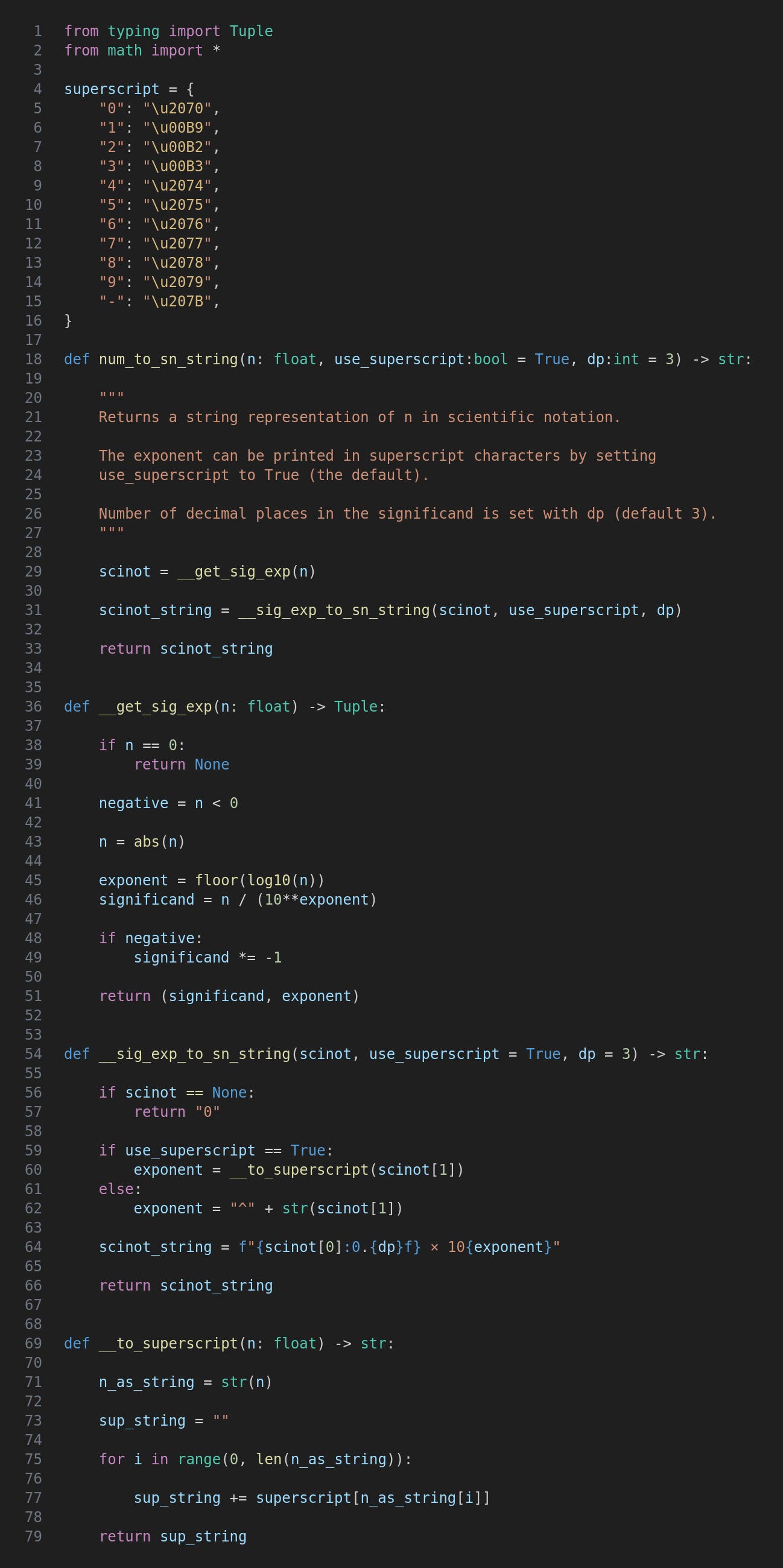
The scientificnotation.py file contains functions to generate a scientific notation string from a number.
The superscript Dictionary
After importing math we have a dictionary mapping digits 1-9 and the minus sign to the Unicode values of their superscript equivalents. These are used to show exponents and as you can see they are not in a single sequence.
The num_to_sn_string Function
This is the public function and takes a number as well as optional use_superscript and dp arguments. It simply calls other functions to get the significand and exponent as a tuple, and then to format these in a scientific notation string.
The __get_sig_exp Function
Firstly we need to check if the number is 0, in which case we return None. Then we need to check whether the number is negative, and convert it to positive using the abs() function.
The next two lines of code are at the heart of this whole project as they calculate the exponent and significand.
The exponent is calculated by taking the base 10 logarithm of the number. The log10 function basically answers the question “what power do I need to raise 10 to to get a given number?” The logarithm is then rounded down to the nearest integer with the floor function.
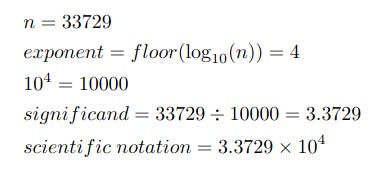
Now we can calculate the significand. Calculating 10 to the power of the exponent will give us a number containing the digit 1, as well as a number of 0s corresponding to how many digits we need to move the decimal place according to the “pen-and-paper” method described above. Once we have this number we divide n by it to increase or decrease it to a value with a single digit integer part.
Obviously we need a couple of examples don’t we? Here goes then.
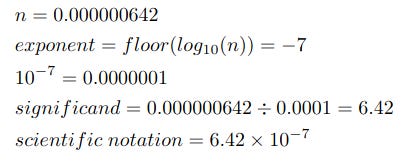
Let’s have another example, this time with a very small number.
Next we flip the significand if n is negative, and finally return the significand and exponent as a tuple.
The __sig_exp_to_sn_string Function
This function takes a tuple generated by __get_sig_exp and builds a string around it. There are two optional arguments, use_superscript and dp to set the number of decimal places in the significand.
Firstly we check whether the tuple is None which it will be if n was 0. In this case we just return the string “0”.
Next we create a string for the exponent, the format depending on use_superscript. If it is True we call __to_superscript which I’ll look at later. If not the string will be “^” plus the non-superscript exponent.
Finally we just need to assemble the scientific notation string. Note the {dp} to set the number of decimal places in the significand. (Yes, you can embed {} within {}.)
The __to_superscript Function
This function takes a number and returns a string containing the number in superscript characters. The number is converted to a string, a new empty string is created for the result, and then we iterate the first string, adding the superscript equivalent of each digit to the result.
As I mentioned earlier, digits and the minus sign are mapped to their superscript equivalents in the superscript dictionary.
Trying It Out
Now let’s look at sndemo.py which contains a few calls to the num_to_sn_string function.
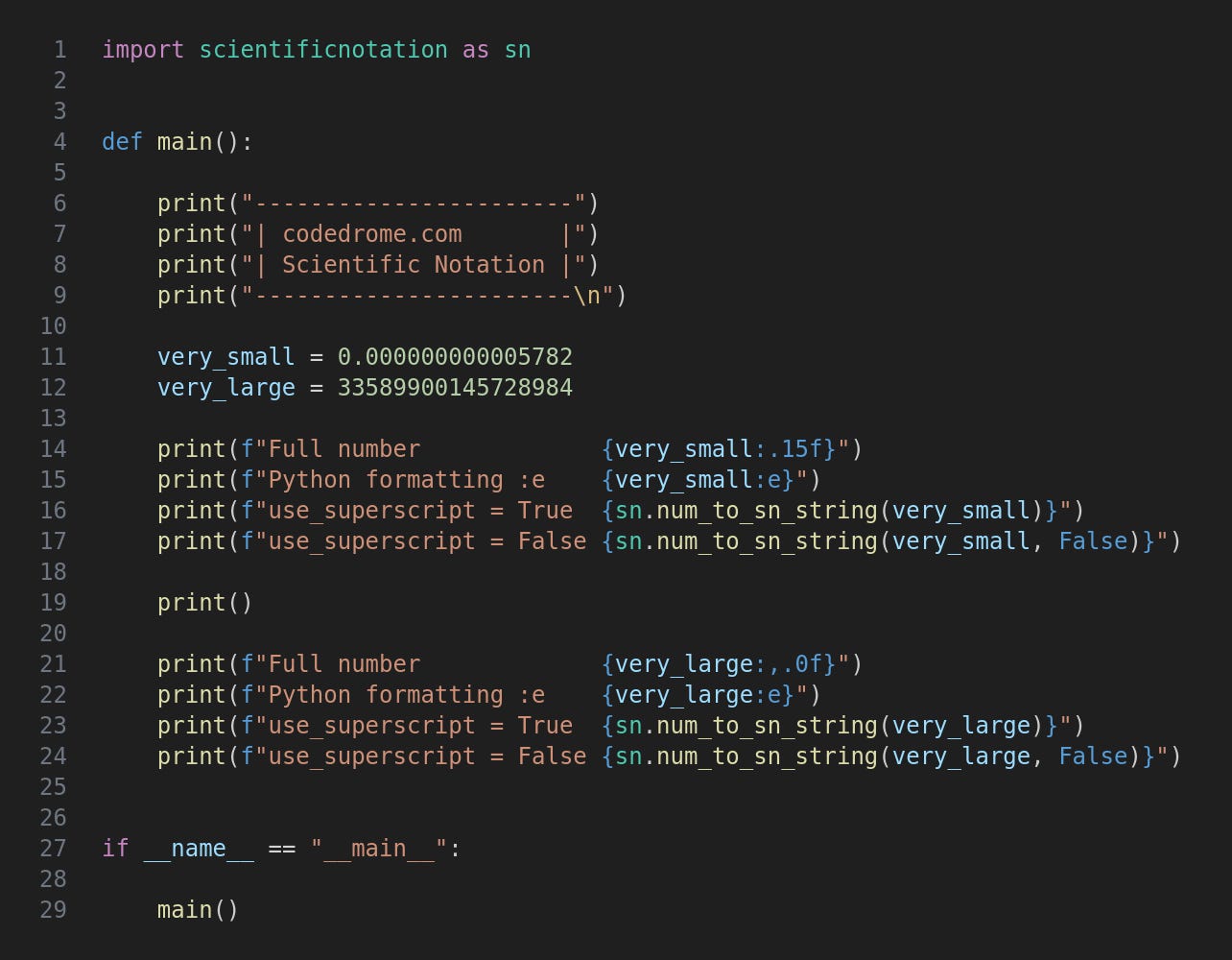
The main function creates a couple of variables, very_small and very_large, and then prints them in four ways.
In full
With Python’s version of scientific notation
Formatted by num_to_sn_string with superscript
Formatted by num_to_sn_string without superscript
Run the program like this.
python3 sndemo.py
This is the output.
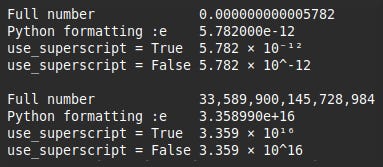
Remember that you can pass a dp argument to num_to_sn_string although I have used the default of 3.
When using superscript with a monospaced font such as here, if there is more than one digit in the exponent they are spread out which looks a bit stupid. I would therefore suggest that you set use_superscript to False for terminal output if you know you could have more than one digit.
For updates and random ramblings please follow me on Bluesky.
No AI was used in creating the code, text or images in this article.